There is no single album cover size that proves a release is ready for every destination. Start with a high-resolution square master, check the requirements of the service receiving your upload, and make a separate delivery copy. A 3000 × 3000 image is a common distributor target, but Apple Music for Artists currently publishes a 4000 × 4000 minimum. This guide explains that difference, then shows how to inspect your source, check the square crop and review a small thumbnail before handing over the artwork.
Keep the best original. Match the delivery file to your actual destination, and check the exported image rather than treating a green preflight report as approval.
1. Check the destination before choosing a size
These are digital release-artwork requirements, checked on 21 October 2026. An artist profile photo, playlist image or social banner is a different asset. Your distributor’s upload instructions and a streaming service’s public guidance describe different delivery routes; do not silently substitute one for another.
| Destination | Published size guidance | Important distinction |
|---|---|---|
| Apple Music for Artists | Square; at least 4000 × 4000 pixels. | Lists JPG, PNG or GIF. A 3000-pixel export falls below this stated minimum. |
| Spotify for Artists | Square; 640–10,000 pixels on each side. | Also specifies lossless encoding and sRGB requirements, and says not to upscale. |
| DistroKid | 1000 × 1000 minimum; ideally 3000 × 3000. | Requests JPG and RGB. Automatic adjustments to a rectangle may change its appearance. |
| CD Baby | 1400 × 1400 minimum; 3000 × 3000 maximum. | Lists several formats and additional file-size and colour requirements. |
Read the linked page in full before submitting. If your distributor asks for 3000 pixels while a platform’s public page says something else, follow that distributor’s documented delivery workflow or ask its support team to resolve the discrepancy. Keep the larger master available. None of these numbers grants rights to an image or guarantees acceptance.
2. Separate source detail, shape and print settings
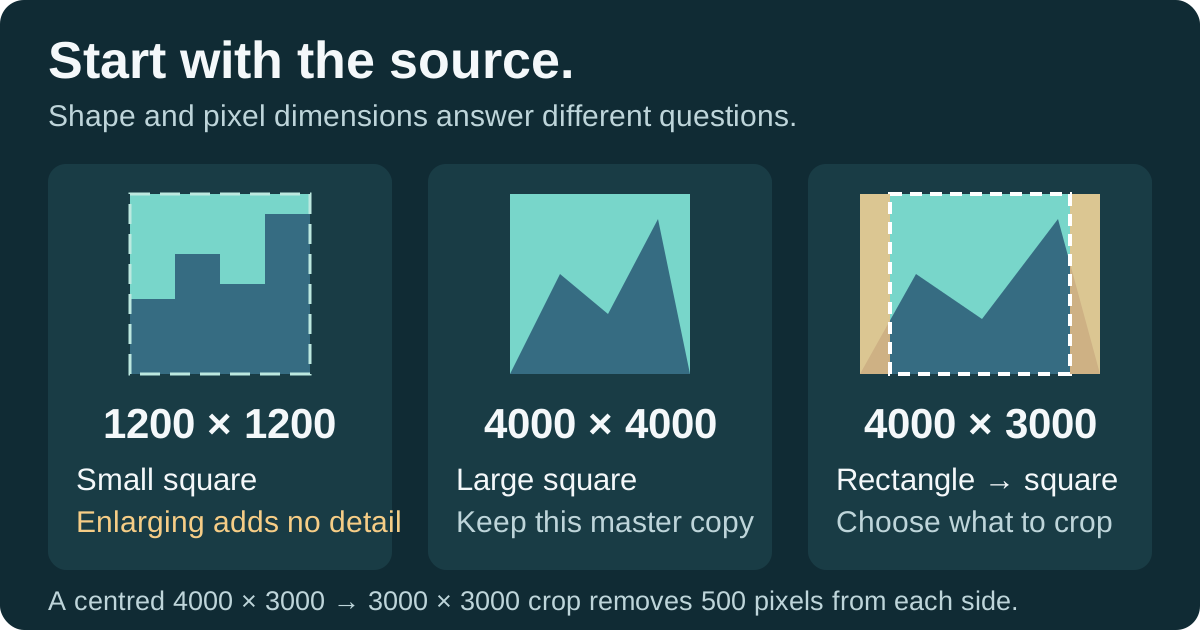
Pixel dimensions describe the file’s width and height. A 4000 × 3000 image is detailed but rectangular; a 1200 × 1200 image is square but much smaller. Changing a DPI label does not add image detail. A printed sleeve additionally needs the printer’s physical dimensions, bleed and trim template; this digital checklist is not a print specification.
Consider three original diagnostic images: a 1200 × 1200 square, a 4000 × 4000 square, and a 4000 × 3000 rectangle. The first needs enlargement to fill a 3000-pixel output. The second can produce a smaller delivery copy while preserving its original master. The third contains enough pixels for a 3000-pixel square crop, but some composition must be discarded.
For a centred crop of that rectangle, 500 pixels disappear from each horizontal edge: (4000 − 3000) ÷ 2. Moving the crop changes which edge is lost. It does not reveal content outside the photograph. Enlarging the small square cannot recover missing detail; obtain a better source or revise the design instead.
3. Review a thumbnail and the crop edges
A large design can look convincing while its title disappears at listening-app size. Make small review copies, for example 300, 120 and 60 pixels wide. These are inspection sizes, not platform upload specifications. View them at their actual display size instead of zooming back in immediately.
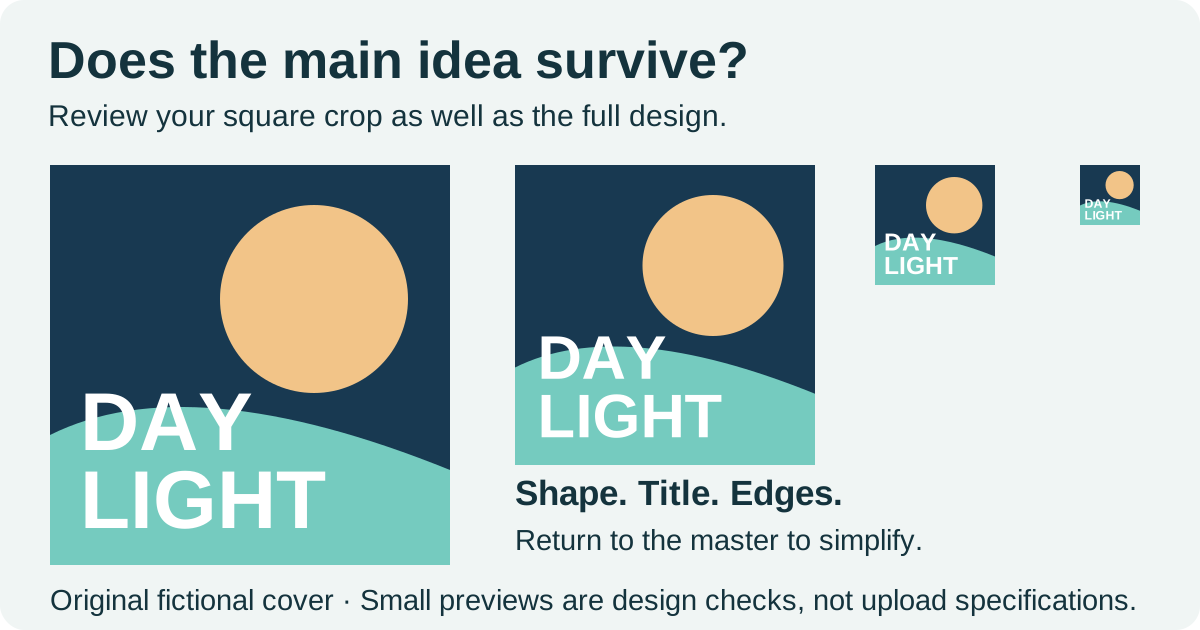
Ask whether the main shape remains recognisable, whether important type survives, and whether faces or lettering sit too close to an edge. If the title becomes a grey line, simplify the composition or strengthen the type hierarchy in your design application. There is no requirement that every decorative detail remain readable.
Check the square version as well as the source rectangle. A title placed safely inside the original photograph can still vanish after a crop. Preserve an editable design file and make deliberate changes there; repeatedly resizing a flattened delivery copy gives you fewer options.
4. Inspect the file in Artwork Preflight
Open Artwork Preflight and choose one JPG, PNG or WebP image, up to the displayed 50 MB limit. The tool reports dimensions, aspect ratio, format, file size and sampled transparency. Its current report and export controls were checked with the three diagnostic images described above.
- Read Dimensions and Aspect ratio before adjusting anything. The 1200-pixel square produces a resolution warning; the rectangle produces a square-frame warning.
- Inspect Square Crop. On a landscape source, move Horizontal focus to choose which side to retain. Vertical focus has no spare height to move in this example.
- Review transparency: transparent areas become white in the JPEG. Keep the original if that changes an intended effect.
- Use Export 3000x3000 JPEG only when that preset suits your delivery route, then choose Download JPEG and reopen the result.
The export is always 3000 × 3000. Even a 4000-pixel square source becomes a 3000-pixel JPEG. That does not meet Apple’s currently stated 4000-pixel minimum. Keep a suitable original and export separately through your design workflow when another size or encoding is required. This browser JPEG preset does not certify Spotify’s lossless-encoding or colour-metadata requirements either.
5. Check the delivery copy before handing it over
Use this short handover checklist:
- Record the actual upload destination, its requirements link and the date checked.
- Keep the editable design and highest-quality source separate from the delivery copy.
- Reopen the downloaded file and confirm dimensions, square framing, transparency treatment and visible sharpness.
- Compare any artist and release text with the submission form; check spelling and version names.
- Review the destination’s restrictions on promotional text, logos and imagery, and confirm you have the necessary permissions.
A technically suitable image can still fail editorial or rights review. A preflight report cannot decide those questions for you. Put the approved artwork beside the correct audio, metadata and lyrics using the music release checklist, and use Release Master Checker for its separate advisory audio checks. Keep the master artwork even after delivery so a later request does not force you to enlarge a smaller JPEG.
Sources & further reading
- Apple Music for Artists: album cover art ↗
- Spotify for Artists: cover art requirements ↗
- DistroKid: album artwork requirements ↗
- CD Baby: artwork requirements ↗
Tool steps checked against the current mp3tools.io browser tools. Platform guidance checked on 21 October 2026.